
-
Choose the Sign in option from the cipherscale status menu on the menu bar or open the app and click the Sign In button.
-
The cipherscale portal will open on your default browser.
-
Enter your cipherscale space name.
-
Click Enter.
-
You will see one or more authentication options.
-
Authenticate.
-
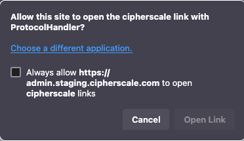
On successful authentication, you will see a popup asking permission to open a cipherscale link.
-
Click the checkbox and click Open Link
-
The cipherscale app will now show the cipherscale space, session duration, and Sign Out button.